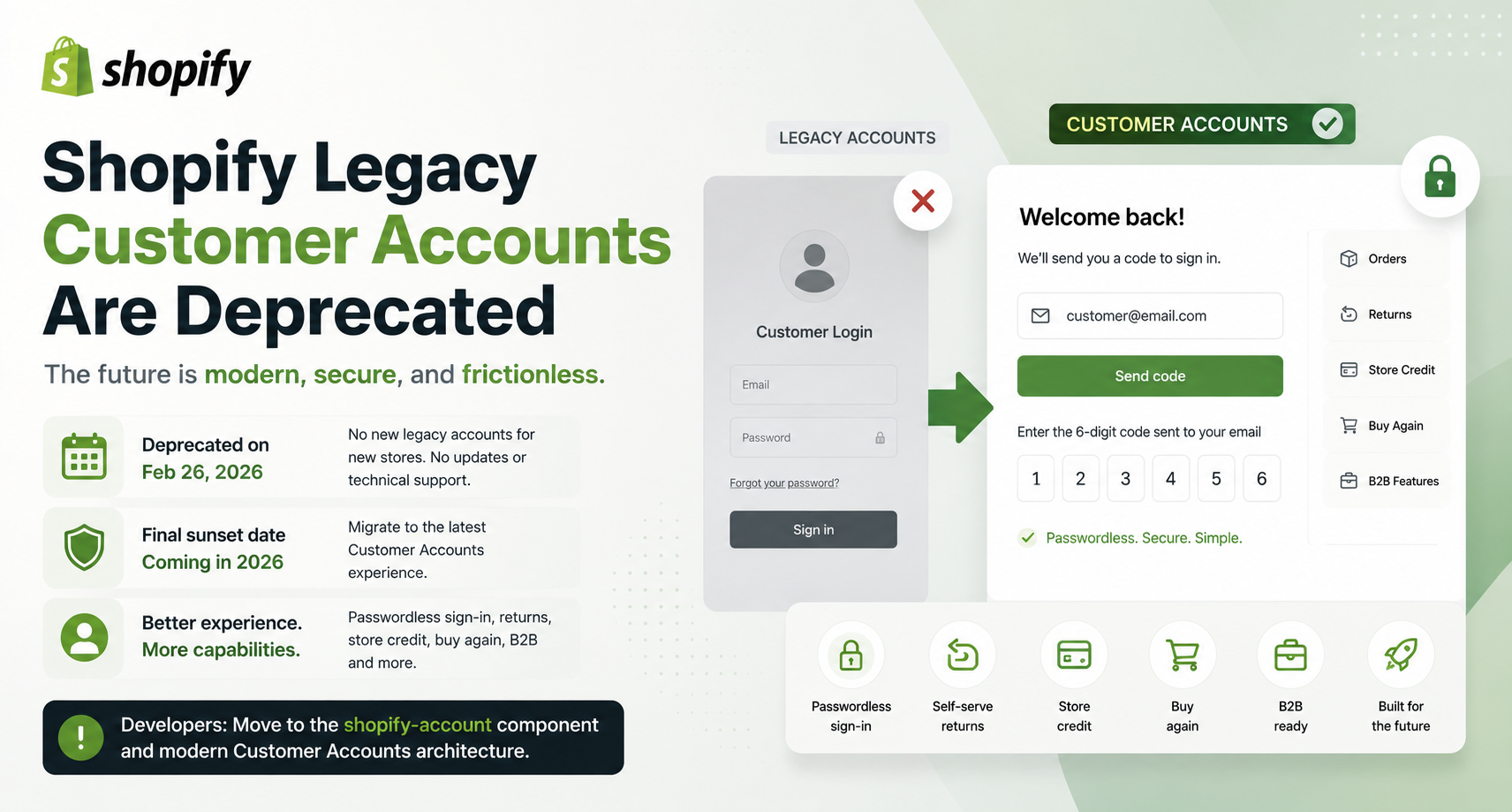
- Shopify deprecated legacy customer accounts on February 26, 2026
- New stores can no longer use legacy accounts; a final sunset date will be announced later in 2026
- The newer Customer Accounts use passwordless sign-in with one-time codes
- Merchants and developers should start planning migration now
For years, Shopify's legacy customer accounts quietly powered millions of customer logins.
Email. Password. Account page. Order history.
It worked.
But eCommerce has changed, and Shopify is now officially moving on.
On February 26, 2026, Shopify deprecated legacy customer accounts. New stores can no longer use them; Shopify has stopped providing feature updates and technical support for the older experience, and Shopify says a final sunset date will be announced later in 2026.
This isn't just a naming change. It's a signal that Shopify wants merchants and developers to build on the new customer account architecture.
What Are Shopify Legacy Customer Accounts?
Legacy customer accounts are Shopify's older customer login system.
Customers typically sign in using:
- Email address
- Password
- Traditional account pages
- Legacy Liquid customer templates
The newer Customer Accounts experience works differently.
Customers can sign in using a one-time six-digit verification code sent by email, without maintaining a password. Shopify also supports additional sign-in options and modern account functionality.
The terminology changed in December 2024, when Shopify renamed "Classic customer accounts" to Legacy customer accounts and "New customer accounts" simply to Customer accounts.
Now the direction is clear. Legacy is being phased out.
Why Shopify Is Moving Away From Legacy Accounts
The biggest reason is modernisation.
Traditional password-based accounts create friction:
- Forgotten passwords
- Password resets
- Locked accounts
- Support requests
- More authentication complexity
The latest Customer Accounts experience removes much of that friction through passwordless authentication.
Customers enter their email and receive a verification code.
No password to remember. No password-reset journey.
Shopify describes the new system as providing a more secure and frictionless sign-in experience.
What Merchants Get With the New Customer Accounts
This is where the migration becomes more than an authentication upgrade. The new Customer Accounts platform supports features that aren't available with legacy accounts.
Passwordless Sign-In
Customers authenticate using a one-time verification code instead of a password.
Self-Serve Returns
Customers can initiate returns directly from their account.
Store Credit
Customers can view and use available store credit.
Buy Again
Customers can quickly reorder products from their previous purchases.
B2B Support
The new customer account architecture supports Shopify B2B capabilities that legacy accounts don't.
App-Based Customisation
Merchants can use customer account app blocks to add functionality without rebuilding legacy Liquid templates.
A Major Change for Shopify Developers
This migration is especially important for theme developers.
Legacy customer accounts relied heavily on Liquid templates such as:
customers/account.liquidcustomers/login.liquidcustomers/register.liquidcustomers/order.liquidcustomers/addresses.liquid
Shopify is moving away from this architecture.
Developers should no longer build new themes around legacy customer account Liquid files. Shopify specifically recommends using the shopify-account web component, which provides access to the modern customer account experience.
There's an important consequence here.
If a store using legacy accounts upgrades to a theme that doesn't contain the legacy account files, Shopify can automatically upgrade that store to the latest Customer Accounts experience.
That's a major architectural signal for theme developers.
What About Shopify B2B?
This is one of the strongest reasons to migrate.
Legacy customer accounts cannot be used for B2B customers and orders.
Shopify's B2B documentation specifically requires the newer Customer Accounts experience for B2B authentication and account management.
Modern B2B buyers can benefit from capabilities such as:
- Company-location accounts
- Passwordless sign-in
- Customer permissions
- Reordering past purchases
- Paying down previous orders
For businesses building wholesale or B2B Shopify stores, the future architecture is therefore already clear.
What Happens to Multipass?
This is another important consideration for developers.
Shopify's Multipass authentication system is tied to legacy customer accounts.
Shopify's developer documentation now labels Multipass as legacy and recommends migrating toward the newer Customer Accounts architecture for better security.
The modern Customer Accounts platform instead supports external identity providers through OAuth 2.0 and OpenID Connect (OIDC), enabling more modern authentication and SSO scenarios.
For enterprise implementations, this is a significant architectural shift.
What Existing Merchants Should Do
If your store still uses legacy customer accounts, don't wait for the final sunset date.
Shopify currently recommends upgrading to the latest Customer Accounts experience.
A sensible migration process looks like this:
- Audit Your Existing Account Experience — Identify custom Liquid templates, account-related apps, custom login flows, Multipass integrations, customer account URLs, custom JavaScript, and third-party authentication.
- Replace Legacy Customizations — Shopify recommends evaluating apps and modern customer account extensions to replace legacy functionality.
- Test Before Going Live — Duplicate your configuration, preview the new account experience, and test customer journeys before switching production traffic.
- Upgrade — Once everything is validated, upgrade through Shopify Admin.
Shopify says merchants can revert within 30 days after upgrading, giving teams an additional safety window for validation.
What Most Developers Get Wrong
The biggest mistake is treating this as a simple UI migration. It's not.
Legacy customer accounts can be deeply connected to:
- Theme code
- Apps
- Authentication systems
- Customer data workflows
- B2B functionality
- Custom integrations
Replacing the login page isn't enough. Developers need to review the entire customer authentication architecture.
The Bigger Shopify Strategy
There's a bigger story here. Shopify isn't simply removing an old login system.
It's building a modern customer identity layer around its commerce platform.
The new architecture connects: Customer → Identity → Account → Orders → Returns → Store Credit → B2B → Apps.
And Shopify continues to expand this ecosystem with Customer Account APIs, account extensions, external identity providers, and new account functionality.
In July 2026, Shopify also made the shopify-account component a requirement for new and updated themes submitted to the Shopify Theme Store.
That's a strong indication of where Shopify wants the ecosystem to go.
Key Takeaways
- Legacy customer accounts were deprecated on February 26, 2026.
- Shopify has stopped feature updates and technical support for the legacy system.
- A final sunset date is expected to be announced later in 2026.
- New Customer Accounts use passwordless authentication.
- Modern accounts support features such as returns, store credit, B2B, and app extensions.
- Developers should move away from legacy customer Liquid templates.
- Multipass is tied to the legacy architecture.
- Shopify's modern Customer Account API and extensions are the future.
Final Thoughts
Legacy customer accounts had a good run. But the web has moved forward.
Customers expect simpler authentication. Businesses expect stronger security. B2B buyers expect better account experiences. Developers expect modern APIs and extensibility.
Shopify is building toward all of those expectations.
So if you're still maintaining a legacy customer account implementation, the question isn't if you should migrate.
It's how prepared you are for the transition.
The future of Shopify customer accounts is passwordless, extensible, API-driven, and deeply connected to the broader commerce experience.
And for merchants and developers, now is the time to build for that future.